-
Posts
18576 -
Joined
-
Days Won
275
Content Type
Profiles
Forums
Events
Everything posted by david_888
-
შეიძლება ქონდეს კიდეც რული რახანც ნავაროჩენი ვერსიაა მარა დაზუსტებით მაშინ გაიგებ როცა იყიდი
-
Radeon™ Software Adrenalin 21.11.3 Highlights Support For Microsoft Flight Simulator™: Game of the Year Edition Farming Simulator 22™ Additional Vulkan® extensions. Click here for more information. Fixed Issues Driver timeouts or game crashes may be experienced by some users while playing Battlefield™ 2042 on some AMD Graphics products such as Radeon™ RX 6900 XT Graphics. While playing DayZ™, some users may experience stuttering or poor performance on some AMD Graphics products such as Radeon™ RX 5700 XT Graphics. Some users may experience elevated disk space consumption by the Multimedia Athena Dumps folder. Known Issues During Marvel’s Guardians of the Galaxy™ gameplay, some users may experience driver timeouts on some AMD Graphics products such as Radeon™ RX 5500 XT Graphics. A temporary workaround is to disable the Radeon™ Anti-Lag feature in Radeon™ Software. Visual artifacts may be observed while playing Call of Duty®: Black Ops Cold War on some AMD Graphics products such as Radeon™ RX 6800M Graphics. While playing PlayerUnknown’s Battlegrounds™ with multiple displays connected in extended mode, Radeon™ Software may become unresponsive when the user is in the lobby and attempts to open Radeon Software on the secondary display via the context menu. A temporary workaround is to press the Alt + R keyboard shortcut if this happens. Enhanced Sync may cause a black screen to occur when enabled on some games and system configurations. Any users who may be experiencing issues with Enhanced Sync enabled should disable it as a temporary workaround. Radeon performance metrics and logging features may intermittently report extremely high and incorrect memory clock values. AMD Link for Windows Known Issues Intermittent grey frame corruption might be observed when streaming with HEVC on certain configurations via an Internet connection. A workaround is to use the AVC encoding setting instead. Important Notes Radeon™ Software Adrenalin 21.11.3 does not provide support for Halo Infinite™ (Multiplayer mode). The Radeon™ Software Adrenalin driver that provides support & game optimizations for Halo Infinite™ (Multiplayer mode) is an early release preview of an upcoming driver and can be found here. Package Contents The Radeon Software Adrenalin 21.11.3 installation package contains the following: Radeon™ Software Adrenalin 21.11.3 Driver Version 21.30.37.01 for Windows® 10 and Windows® 11 (Windows Driver Store Version 30.0.13037.1003). The Radeon Software Adrenalin 21.11.3 installation package can be downloaded from the following links: By clicking the Download button, you are confirming that you have read and agreed to be bound by the terms and conditions of the End User License Agreement (“EULA”). If you do not agree to the terms and conditions of these licenses, you do not have a license to any of the AMD software provided by this download. Radeon Software Adrenalin 21.11.3 Driver for Windows® 10 & Windows® 11 64-bit Installing Radeon Software Adrenalin For detailed instructions on how to correctly uninstall or install Radeon Software Adrenalin, please refer to the following support resources: How-To Uninstall Radeon Software Adrenalin on a Windows® Based System How-To Install Radeon Software Adrenalin on a Windows® Based System NOTE: This driver is not intended for use on AMD Radeon products running in Apple Boot Camp platforms. Users of these platforms should contact their system manufacturer for driver support. When installing Radeon Software Adrenalin 21.11.3 for the Windows® operating system, the user must be logged on as Administrator, or have Administrator rights to complete the installation of Radeon Software Adrenalin 21.11.3. Radeon Product Compatibility Radeon Software Adrenalin 21.11.3 is compatible with the following AMD Radeon products. Radeon™ RX 6900/6800/6700/6600 Series Graphics Radeon™ RX 5700/5600/5500/5300 Series Graphics Radeon™ VII Radeon™ RX Vega Series Graphics AMD Radeon™ Pro Duo Radeon™ RX 500 / Radeon 500X Series Graphics Radeon™ RX 400 Series Graphics
-
ეგ შენ უნდა გადაწყვიტო
-
რათქმაუნდა
- 1 reply
-
- 1
-
-
i5 3470 და i3 2130-ზე მიყენია, ორივე სისტემა დაფრინავს არანაირი ლაგები
-
სპეციალურად არ ვეძებ და დალშე არანაირი ბაგები არ მქონია, ლაპარაკი მაქ ე.წ საოჯახო სისტემებზე ზედმეტი აპარატურეის გარეშე, თამაშები და ა.შ არ ვიცი ძირითად სისტემაზე 10 მიყენია ერთაედრთი მე აფგრეიდები არ გამიკეთებია ყველაგან ნოლიდან დავაყენე დაჟე ფართიშენების წაშლით
-
ამ შემთხვევაში არც არანაირი პრობლემა არ გექნება მე რამდენიმე კომპზე დავაყენე და არავის არაფერზე დაუწუწუნია, ჩემ მეორე სისტემაზეც მიყენია რომელსაც მთელი დღე ვიყენებ (tv-ზე მაქ მიერთებული) და ანალოგიურად no problem, ეხლახანს სამსახურის კომპზეც დავაყენე და იქ ერთადერთი პრინტერის დრაივერზე შემექმნა პრობლემა, 11-ის არ გამოუშვიათ ჯერ და 10-სა არ დგება, დალშე ბაგები არაფერი შემიმჩნევია
-
https://www.amazon.com/Replacement-HyperX-Mechanical-Gaming-Keyboard/dp/B0822437W2
-
ისევ აქტუალურია მგონი )))
-
ვინდი გადააყენე პირველ რიგში
-
მოდი ერთი 2 კვირა ითამაშე, გახსენი იარაღები დააპრაკაჩკე ბოლომდე რუქებიც დაამუღამე და მერე გააკეთე საბოლოო დასკვნები, რაიცი იქნებ აზრი შეგეცვალოს, მე ლიჩნად ეს ნაწილი ყველას მირჩევნია
-
11-ზე მოსინჯე ადრე კარგად მუშაობდა, ეხლა არ მკყენია ბოლო 1 თვეა თამაში ტავიდანვე არ მოგწონდა და რაღას წვალობ ))) პ.ს bf11 პირველ რიგში იარაღების გამო არ მნომწონს, ძაან ცუდადაა გაკეთებული, არაბატლფიდურად, 5-ში კაკრაზ ეგ საკითხია მაღალ დონეზე
-
future frame rendering
-
ისე ffr-ით მოსინჯე თამაში?
-
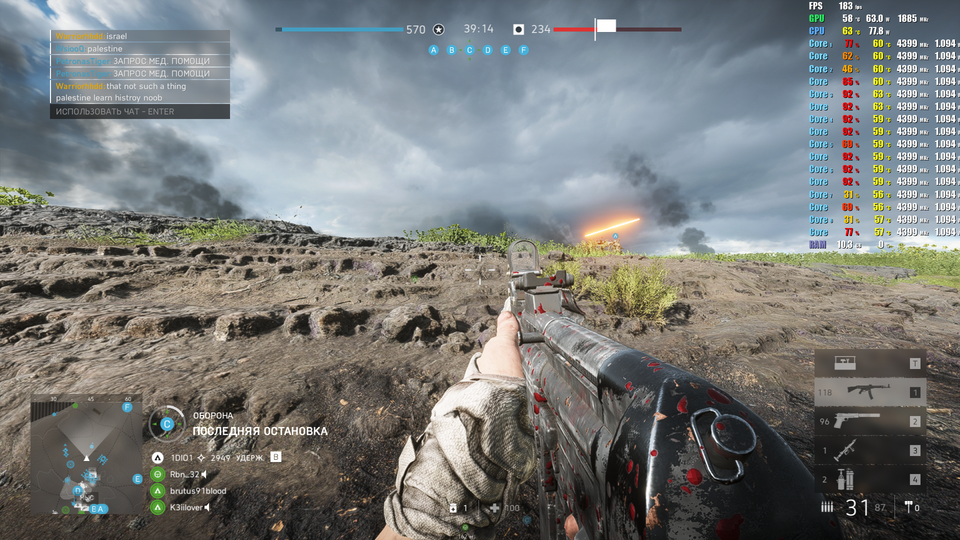
ეგ მომენტი მეც მიშლიდა ნერვებს, დავხტოდი 11-12-ზე, მარა საბოლოდ დავიკიდე, საერთორ აღარ ვამონიტორებ fps-ს და ვთამაშობ ხოშიანად 11-ზე, 80-ა თუ 90 კომფორტულად კი მეთამაშება
-
პირველ პრობემას გადავეყარე 11-ზე, პრინტერის დრაივერი არ ყენდება
-
რაღაცა რო ვერ მოდის ისე როგორც უნდა მოდიოდეს ყოველთვის პროვადერი ბრალი არაა პ.ს ისე რა გინდა იმაზე მეტით მოაქ ვიდრე უნდა მოქონდეს
-
არ გირჩევ, მე სამივე მაქ მაგთი მაინც ყველაზე კაია
-
ეხლა სამსახურში ვარ და აქედანაც შევედი ბეზ პრაბლემ, იპ-ზე ხო არ დაგადეს ბანი
-
Radeon™ Software Adrenalin 21.10.3 Highlights Support For Marvel’s Guardians of the Galaxy™ Up to 21% increase in performance in Marvel’s Guardians of the Galaxy™ @ 4K Ultra Settings, using Radeon™ Software Adrenalin 21.10.3 on the 16 GB Radeon™ RX 6900 XT graphics card, versus the previous software driver version 21.10.2.RS-423 Up to 21% increase in performance in Marvel’s Guardians of the Galaxy™ @ 4K Ultra Settings, using Radeon™ Software Adrenalin 21.10.3 on the 16 GB Radeon™ RX 6800 XT graphics card, versus the previous software driver version 21.10.2.RS-424 Riders Republic™ Age of Empires™ IV Up to 45% increase in performance in Age of Empires™ IV @ 4K Max Settings, using Radeon™ Software Adrenalin 21.10.3 on the 16 GB Radeon™ RX 6800 XT graphics card, versus the previous software driver version 21.10.2.RS-425 Doom® Eternal: Update 6.66 Fixed Issues In Radeon™ Software, the CPU Tuning feature may be missing for some users with AMD Processors such as Ryzen™ 9 5950X Processor. Some users may experience elevated disk space consumption by the Multimedia Athena Dumps folder. While playing a game, some users may experience a black screen flicker if they have multiple displays connected and they attempt to switch between open windows (via Alt + Tab shortcut). Battlefield™ V may crash during gameplay on some AMD Graphics products such as Radeon™ RX 6600 Graphics. Image corruption may be observed on some characters when Radeon™ Boost is enabled while playing Cyberpunk 2077® on some AMD Graphics products such as Radeon™ RX 6700 XT Graphics. Known Issues Users may experience display corruption issues when they set their Samsung™ Odyssey G9 C49G95T monitor to 5120X1440 @ 240Hz. Visual artifacts may be observed while playing Call of Duty®: Black Ops Cold War on some AMD Graphics products such as Radeon™ RX 6800M Graphics. AMD Radeon™ Software may crash or become unresponsive while playing some DirectX® 11 games such as PlayerUnknown’s Battlegrounds™ with multiple displays connected in extended mode. Enhanced Sync may cause a black screen to occur when enabled on some games and system configurations. Any users who may be experiencing issues with Enhanced Sync enabled should disable it as a temporary workaround. Radeon performance metrics and logging features may intermittently report extremely high and incorrect memory clock values. AMD Link for Windows Known Issues Intermittent grey frame corruption might be observed when streaming with HEVC on certain configurations via an Internet connection. A workaround is to use the AVC encoding setting instead. Footnote RS-423 – Testing conducted by AMD as of October 21, 2021, on a test system comprised of a Ryzen 9 5900X CPU, 16GB DDR4, Radeon RX 6900 XT GPU, and Windows 10 Pro, with Radeon Software Adrenalin 21.10.3 and 21.10.2 on Marvel’s Guardians of the Galaxy™. Game tested with ultra preset at 4K. Performance may vary. RS-424 – Testing conducted by AMD as of October 21, 2021, on a test system comprised of a Ryzen 9 5900X CPU, 16GB DDR4, Radeon RX 6800 XT GPU, and Windows 10 Pro, with Radeon Software Adrenalin 21.10.3 and 21.10.2 on Marvel’s Guardians of the Galaxy™. Game tested with ultra preset at 4K. Performance may vary. RS-425 – Testing conducted by AMD as of October 20, 2021, on a test system comprised of a Ryzen 9 5900X CPU, 16GB DDR4, Radeon RX 6800 XT GPU, and Windows 10 Pro, with Radeon Software Adrenalin 21.10.3 and 21.10.2 on Age of Empires™ IV. Game tested with max preset at 4K. Performance may vary. Package Contents The Radeon Software Adrenalin 21.10.3 installation package contains the following: Radeon Software Adrenalin 21.10.3 Driver Version 21.30.31.01 for Windows® 10 and Windows® 11 (Windows Driver Store Version 30.0.13031.1001). The Radeon Software Adrenalin 21.10.3 installation package can be downloaded from the following links: By clicking the Download button, you are confirming that you have read and agreed to be bound by the terms and conditions of the End User License Agreement (“EULA”). If you do not agree to the terms and conditions of these licenses, you do not have a license to any of the AMD software provided by this download. Radeon Software Adrenalin 21.10.3 Driver for Windows® 10 & Windows® 11 64-bit Installing Radeon Software Adrenalin For detailed instructions on how to correctly uninstall or install Radeon Software Adrenalin, please refer to the following support resources: How-To Uninstall Radeon Software Adrenalin on a Windows® Based System How-To Install Radeon Software Adrenalin on a Windows® Based System NOTE: This driver is not intended for use on AMD Radeon products running in Apple Boot Camp platforms. Users of these platforms should contact their system manufacturer for driver support. When installing Radeon Software Adrenalin 21.10.3 for the Windows® operating system, the user must be logged on as Administrator, or have Administrator rights to complete the installation of Radeon Software Adrenalin 21.10.3. Radeon Product Compatibility Radeon Software Adrenalin 21.10.3 is compatible with the following AMD Radeon products. Radeon™ RX 6900/6800/6700/6600 Series Graphics Radeon™ RX 5700/5600/5500/5300 Series Graphics Radeon™ VII Radeon™ RX Vega Series Graphics AMD Radeon™ Pro Duo Radeon™ RX 500 / Radeon 500X Series Graphics Radeon™ RX 400 Series Graphics
-
მეც მაგთი მაქ